Run matches and replays
Run a match
#spimbot run plays a match between one or two bots, bot 0 first, to its end. It prints the seed, each bot's score and status, then the result:
spimbot run alice.s bob.s --seed 3Seed: 3
Bot Score Status
alice 81 Running
bob 113 Running
bob wins after 10,000,000 cyclesAn exception goes to the bot's exception handler, and a bot that reads its console waits forever, since run has no console input. When a program doesn't assemble, run prints its errors and exits with code 1.
--seed, --mode, --cycles and --tournament set up the match, as the match options describe. Without --seed, the match gets a random seed. Pass the printed seed to play the same match again.
--console prints each bot's console output as [bot N] line. --json prints the result as JSON and sends the console output to standard error:
spimbot run bot.s --cycles 100000 --console --jsonSave the match
#spimbot run alice.s bob.s --seed 3 --replay match.spr --png end.png --video match.mp4
spimbot run alice.s bob.s --seed 3 --recording match.spv| Option | Saves |
|---|---|
--replay |
A replay (.spr) with the programs and settings that play the match again |
--png |
The final map |
--video |
A video (.mp4, .webm or .gif). Needs ffmpeg on your PATH |
--recording |
A recording (.spv) of the drawn frames, which plays in a browser |
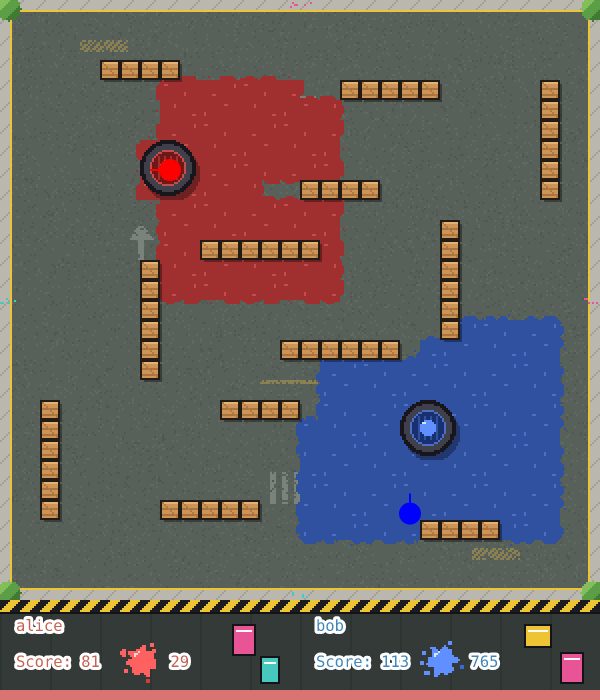
The first command saves this map as end.png:
--every N sets the cycles per frame of the video and the recording. File formats describes each file.
A replay holds your bots' source code, and replay verify and export run it. Keep your replays private, and open only replays you trust. To share a match, share a recording or a video.
Inspect and verify a replay
#spimbot replay info match.spr
spimbot replay verify match.sprreplay info prints the replay's settings, bots and outcome:
Seed: 3
Mode: normal
Cycle limit: 10,000,000
Cycles per tick: 1
Tournament: no
Checksum interval: 100,000
Bot 0: alice (alice.s)
Bot 1: bob (bob.s)
Inputs: 0
End cycle: 10,000,000
Outcome: bob wins
Scores: 81, 113
replay verify plays the match again and checks it against the replay's checkpoints. It prints Matches the replay through cycle 10,000,000, or Diverged: and the difference with exit code 1.
Export from a replay
#spimbot export renders a replay to a PNG, a video or a recording, picked by the output's extension:
spimbot export match.spr end.png
spimbot export match.spr match.webm --every 5000 --scale 3
spimbot export match.spr match.gif --scale 1
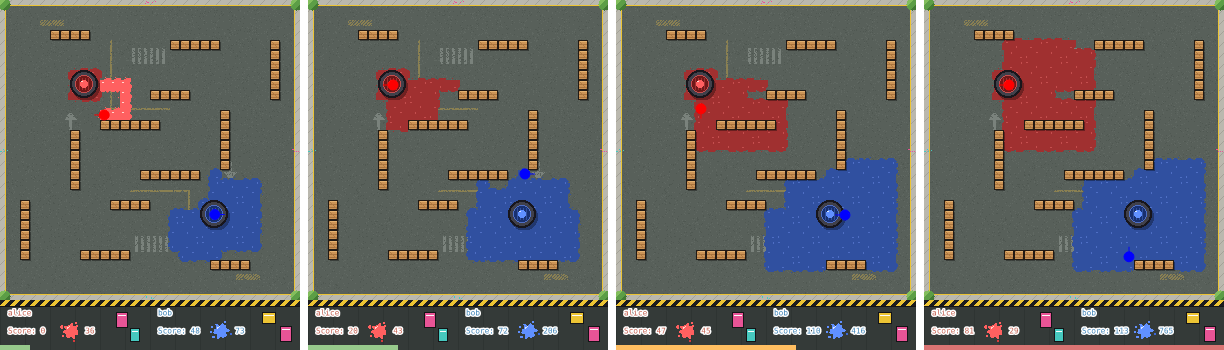
A video takes a frame every --every cycles, a thousandth of the cycle limit by default. The last command writes 1,001 frames, one every 10,000 cycles. These four show the match at cycles 1,000,000, 3,000,000, 6,000,000 and 10,000,000, with the time bar filling along the bottom:
export lists every option.
Run a local tournament
#spimbot tournament plays every pair of two or more bots under tournament rules, then ranks them:
spimbot tournament alice.s bob.s carol.sBot Played Won Tied Lost Points
carol 4 4 0 0 2,610
bob 4 2 0 2 188
alice 4 0 0 4 150Each pair plays each seed twice, once with each bot as bot 0. --seeds N plays seeds 0 to N - 1, and the default is seed 0 alone.
--jobs sets the matches played at once, one per CPU core by default. --replays saves each match's replay in a directory, with names such as 01-alice-vs-bob-seed0.spr:
spimbot tournament alice.s bob.s carol.s --seeds 4 --jobs 8 --replays replaystournament lists every option.